
Claude Code Motion Graphics: 16 Animations, One Prompt Each
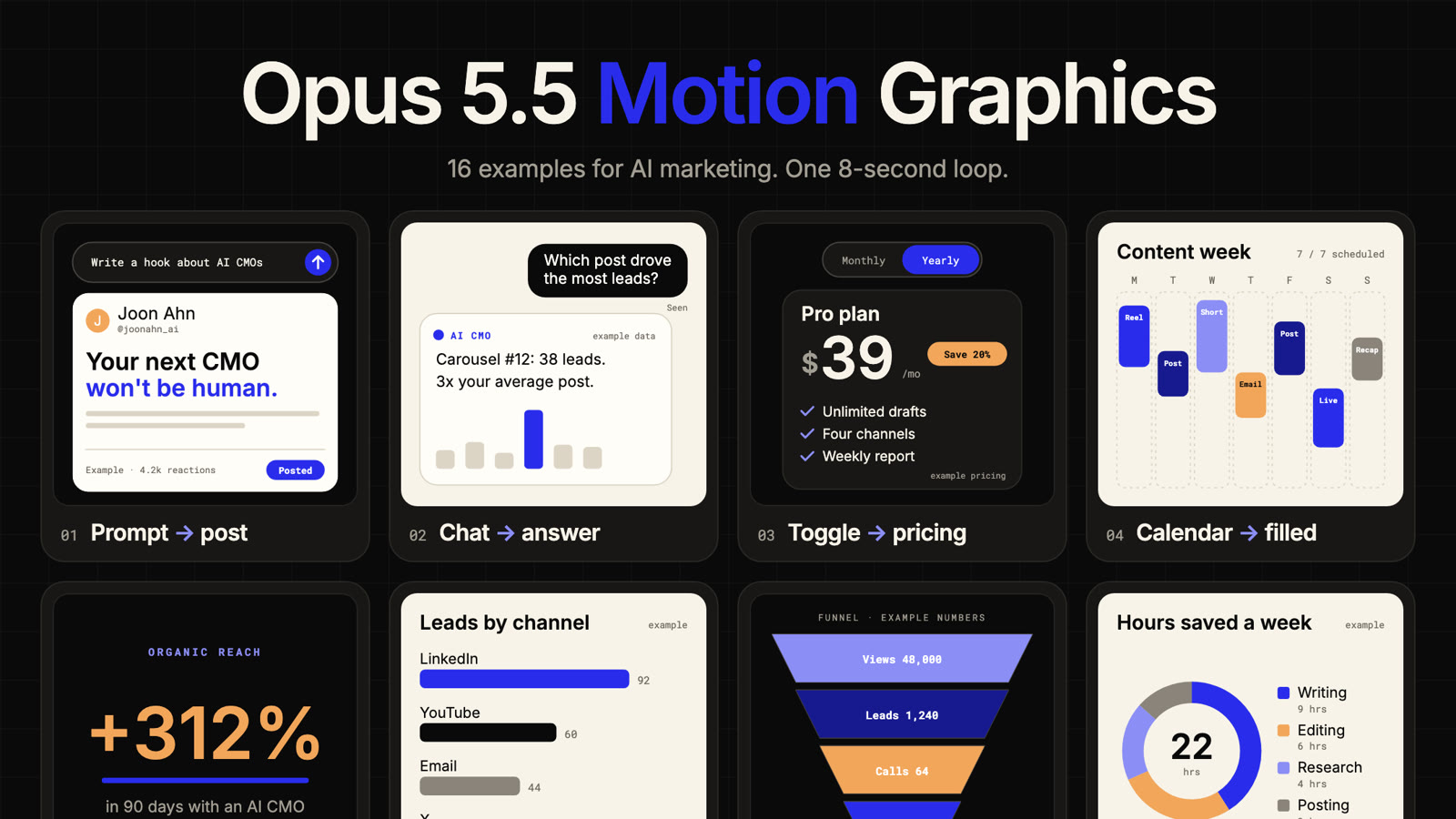
I wanted motion graphics for my posts without opening After Effects. So I asked Opus 5.5 in Claude Code to build them.
The result is one board with 16 animations for AI marketing, all on the same 8-second loop. Every one is plain HTML. No design tool, no plugins, no render queue.
Here it is running live:
Below: what's on the board, how the prompts work, all 16 prompts you can copy right now, and the checklist I run before anything gets posted.
What "Motion Graphics With Claude Code" Actually Means
Motion graphics used to mean After Effects, keyframes, and a few hours per clip.
With Claude Code, an animation is a single HTML file. Claude writes the shapes, the text and the timing as code. You open the file in a browser and it plays.
Three things make that work:
- One loop. Every tile runs on the same 8-second cycle: rest, animate in, hold, animate back. So it loops without a jump.
- The clock drives every frame. Each frame is a function of time. You can pause on any second and get a clean still, or step through frames to record an MP4.
- Everything is embedded. The fonts are built into the file, so it plays offline and looks the same on any machine.
You don't need to read the code. You describe the change, Claude makes it.
The 16 Animations
The board is split into four groups. Each group solves a different content problem.
Interfaces: Show Your AI Doing the Work
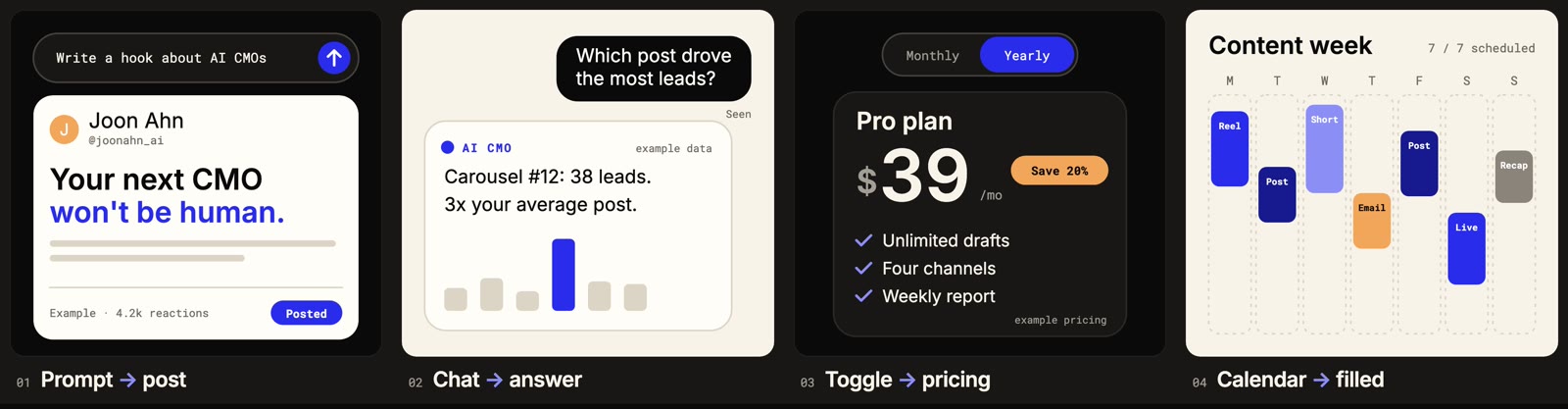
| # | Animation | Use it when |
|---|---|---|
| 01 | Prompt → post | You show what your AI tool writes from one prompt |
| 02 | Chat → answer | You demo an assistant answering a real customer question |
| 03 | Toggle → pricing | You push the annual plan on a pricing page or offer email |
| 04 | Calendar filled | You show your weekly posting plan or what a client gets each week |
Data: Make a Number Land
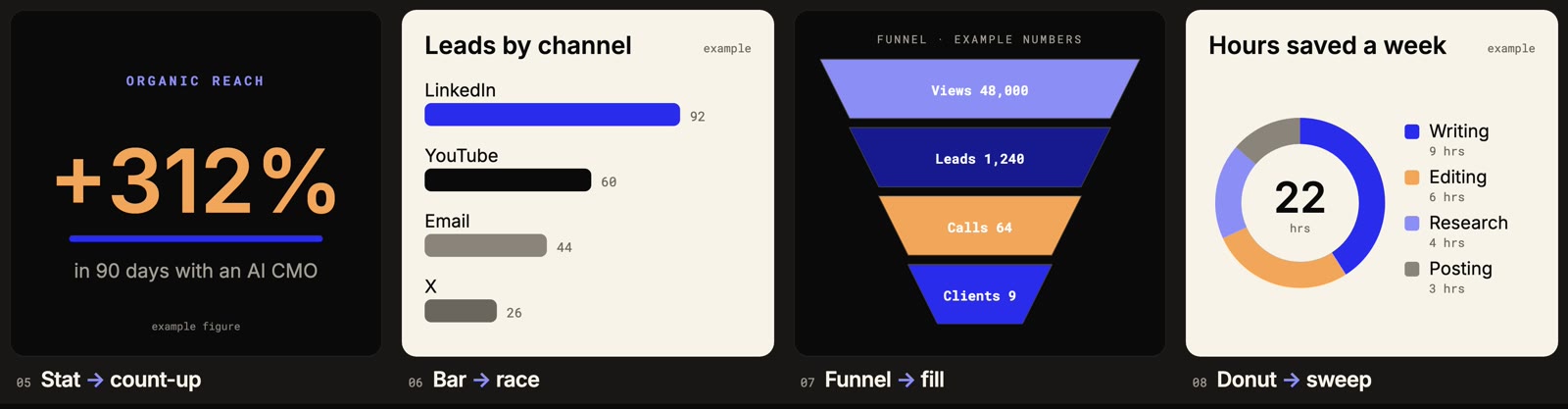
| # | Animation | Use it when |
|---|---|---|
| 05 | Stat count-up | You lead a case study with the one number that matters |
| 06 | Bar race | You show which channel won the month |
| 07 | Funnel fill | You explain your funnel from views to clients |
| 08 | Donut sweep | You show where time or budget goes |
Type: Make the Words Move
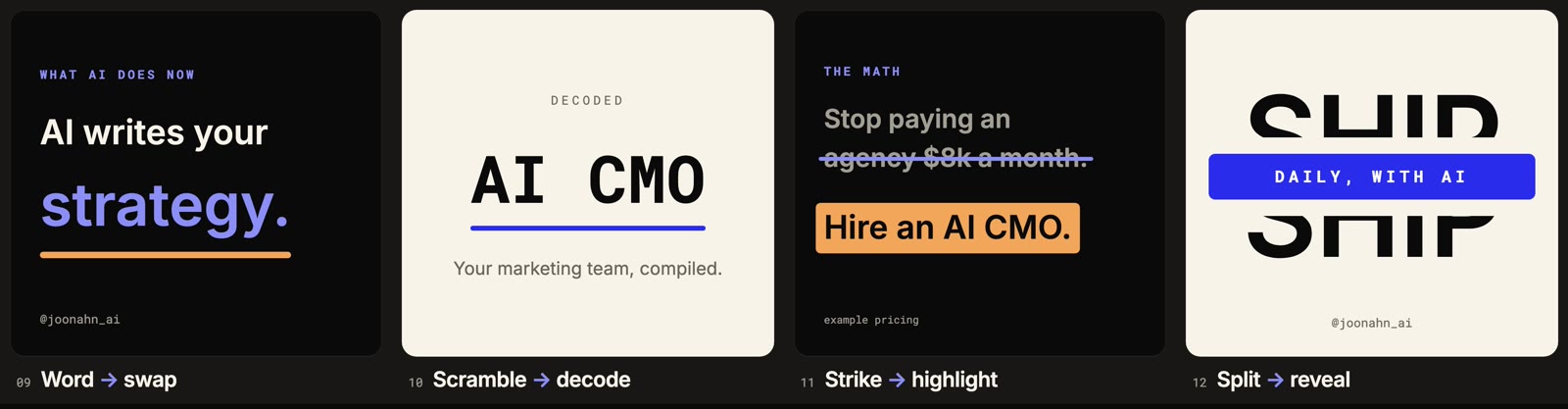
| # | Animation | Use it when |
|---|---|---|
| 09 | Word swap | You open a Reel with a line that keeps changing its ending |
| 10 | Scramble decode | You reveal a product name or the keyword of a launch |
| 11 | Strike → highlight | You land a before-and-after positioning line |
| 12 | Split reveal | You open a series or a launch week with a title card |
Systems: Explain How Things Connect
| # | Animation | Use it when |
|---|---|---|
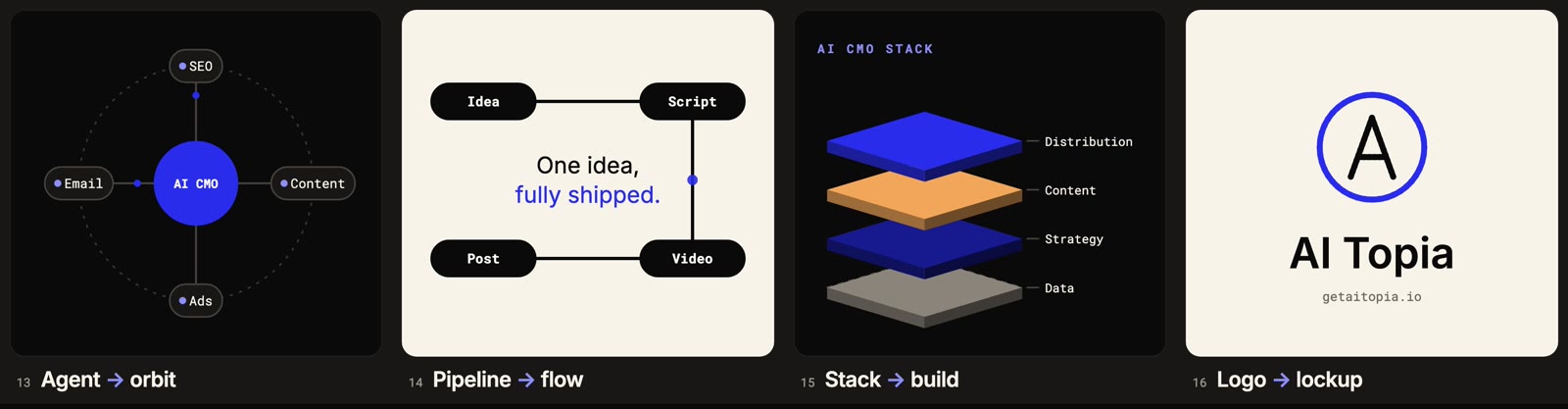
| 13 | Agent orbit | You explain a multi-agent setup or the services around one offer |
| 14 | Pipeline flow | You show your process in four steps |
| 15 | Stack build | You explain the layers of your offer or your tech stack |
| 16 | Logo lockup | You close a Reel, video or launch post with your mark |
Every number on the board is made up for the demo and labeled "example". Swap in your real figures before you post.
How the Prompts Work
Each prompt does one job: copy a single tile out of the board into its own file, effect.html, scaled up, with the same motion and loop. Then it swaps in your words and colours. Nothing else.
That constraint is the whole trick. Ask Claude to "make an animation about X" and you get something new and unpredictable every time. Ask it to copy a tile that already works and change only the words, and you keep the motion that works.
The setup takes two minutes:
- Put
motion-board.htmlin a folder. - Open Terminal,
cdinto the folder, runclaude, and pick Opus 5.5 with/model. - Paste a prompt and fill in the square brackets.
- Double-click
effect.htmlwhen it finishes and watch it loop.
All 16 Prompts
Copy one, fill in the square brackets, paste it into Claude Code. Each prompt works on its own.
Interface Prompts (01 to 04)
01 · Prompt → post. You show what your AI tool writes from one prompt, on a landing page or in a launch post.
Open motion-board.html and copy tile 01, "Prompt → post" (a prompt, "Write a hook about AI CMOs", typed into an AI box that then grows a LinkedIn post card underneath), into effect.html: that tile alone, scaled up, same motion and 8-second loop. Keep the embedded fonts and every "example" label on demo numbers. Then change only the words and colours. Words: [e.g. our prompt "Draft a welcome email" and the email it writes]. Colours: [two hex codes, or keep AI Topia Electric Blue #292DEB with Ember #F2A65A].
02 · Chat → answer. You demo your assistant or chatbot answering a question your customers really ask.
Open motion-board.html and copy tile 02, "Chat → answer" (the question "Which post drove the most leads?" answered by an AI CMO reply with a mini bar chart), into effect.html: that tile alone, scaled up, same motion and 8-second loop. Keep the embedded fonts and every "example" label on demo numbers. Then change only the words and colours. Words: [e.g. "Which plan should I pick?" answered with "Pro, it covers 4 channels"]. Colours: [two hex codes, or keep AI Topia Electric Blue #292DEB with Ember #F2A65A].
03 · Toggle → pricing. You push the annual plan on a pricing page, an offer email or a Black Friday post.
Open motion-board.html and copy tile 03, "Toggle → pricing" (a Monthly to Yearly toggle that rolls the Pro price from $49 to $39 and pops a "Save 20%" pill), into effect.html: that tile alone, scaled up, same motion and 8-second loop. Keep the embedded fonts and every "example" label on demo numbers. Then change only the words and colours. Words: [e.g. our "Growth" plan, $99 to $79, "Save 2 months"]. Colours: [two hex codes, or keep AI Topia Electric Blue #292DEB with Ember #F2A65A].
04 · Calendar → filled. You show your weekly posting plan, or what a client gets from you every week.
Open motion-board.html and copy tile 04, "Calendar → filled" (seven content blocks (Reel, Post, Short, Email, Post, Live, Recap) dropping into a week grid), into effect.html: that tile alone, scaled up, same motion and 8-second loop. Keep the embedded fonts and every "example" label on demo numbers. Then change only the words and colours. Words: [e.g. Mon to Sun: Podcast, Clip, Post, Newsletter, Clip, Live, Recap]. Colours: [two hex codes, or keep AI Topia Electric Blue #292DEB with Ember #F2A65A].
Data Prompts (05 to 08)
05 · Stat → count-up. You lead a case study or results post with the one number that matters.
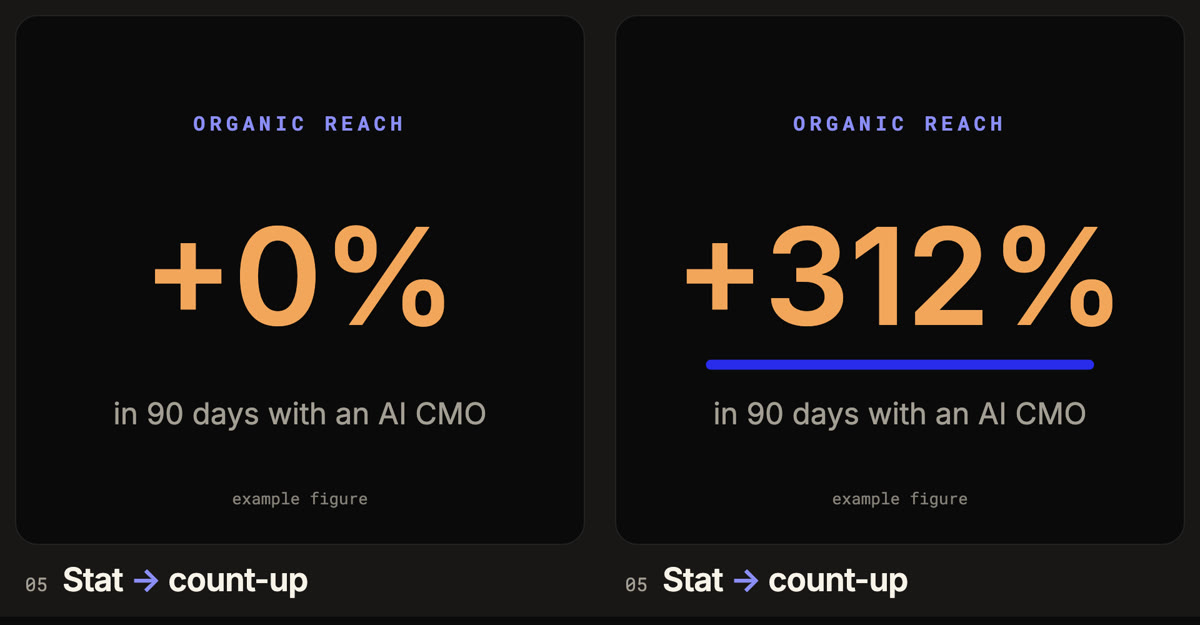
Open motion-board.html and copy tile 05, "Stat → count-up" (a big "+312%" organic reach number counting up over a blue underline), into effect.html: that tile alone, scaled up, same motion and 8-second loop. Keep the embedded fonts and every "example" label on demo numbers. Then change only the words and colours. Words: [e.g. "+48 booked calls" in 30 days]. Colours: [two hex codes, or keep AI Topia Electric Blue #292DEB with Ember #F2A65A].
06 · Bar → race. You show which channel won the month in a client report or a results post.
Open motion-board.html and copy tile 06, "Bar → race" (four channels (LinkedIn, YouTube, Email, X) racing, with LinkedIn overtaking YouTube), into effect.html: that tile alone, scaled up, same motion and 8-second loop. Keep the embedded fonts and every "example" label on demo numbers. Then change only the words and colours. Words: [e.g. Instagram, TikTok, Newsletter and Podcast with our real lead counts]. Colours: [two hex codes, or keep AI Topia Electric Blue #292DEB with Ember #F2A65A].
07 · Funnel → fill. You explain your funnel in a sales deck, a Skool lesson or a "how I get clients" post.
Open motion-board.html and copy tile 07, "Funnel → fill" (a Views, Leads, Calls, Clients funnel filling stage by stage while the numbers count up), into effect.html: that tile alone, scaled up, same motion and 8-second loop. Keep the embedded fonts and every "example" label on demo numbers. Then change only the words and colours. Words: [e.g. Visitors, Sign-ups, Trials, Customers with our last-quarter figures]. Colours: [two hex codes, or keep AI Topia Electric Blue #292DEB with Ember #F2A65A].
08 · Donut → sweep. You show where time or budget goes before and after automation.
Open motion-board.html and copy tile 08, "Donut → sweep" (a donut sweeping to 22 hours saved a week, split into Writing, Editing, Research and Posting), into effect.html: that tile alone, scaled up, same motion and 8-second loop. Keep the embedded fonts and every "example" label on demo numbers. Then change only the words and colours. Words: [e.g. monthly ad budget split across Meta, Google, YouTube and Creators]. Colours: [two hex codes, or keep AI Topia Electric Blue #292DEB with Ember #F2A65A].
Type Prompts (09 to 12)
09 · Word → swap. You open a reel or a hero section with a line that keeps changing its ending.
Open motion-board.html and copy tile 09, "Word → swap" ("AI writes your" with the last word rolling through posts, scripts, emails and landing on "strategy."), into effect.html: that tile alone, scaled up, same motion and 8-second loop. Keep the embedded fonts and every "example" label on demo numbers. Then change only the words and colours. Words: [e.g. "We automate your" invoices, onboarding, reporting, growth.]. Colours: [two hex codes, or keep AI Topia Electric Blue #292DEB with Ember #F2A65A].
10 · Scramble → decode. You reveal a product name, a new offer or the keyword of a launch.
Open motion-board.html and copy tile 10, "Scramble → decode" (random glyphs decoding letter by letter into "AI CMO", then a tagline fading in), into effect.html: that tile alone, scaled up, same motion and 8-second loop. Keep the embedded fonts and every "example" label on demo numbers. Then change only the words and colours. Words: [e.g. our product name, with tagline "Launching Monday"]. Colours: [two hex codes, or keep AI Topia Electric Blue #292DEB with Ember #F2A65A].
11 · Strike → highlight. You land a before and after positioning line for an ad or a carousel cover.
Open motion-board.html and copy tile 11, "Strike → highlight" ("Stop paying an agency $8k a month." struck through, then "Hire an AI CMO." highlighted in ember), into effect.html: that tile alone, scaled up, same motion and 8-second loop. Keep the embedded fonts and every "example" label on demo numbers. Then change only the words and colours. Words: [e.g. strike "Posting every day by hand." highlight "Let the system post."]. Colours: [two hex codes, or keep AI Topia Electric Blue #292DEB with Ember #F2A65A].
12 · Split → reveal. You open a series, a challenge or a launch week with a title card.
Open motion-board.html and copy tile 12, "Split → reveal" (the word "SHIP" splitting open to reveal a blue band that reads "DAILY, WITH AI"), into effect.html: that tile alone, scaled up, same motion and 8-second loop. Keep the embedded fonts and every "example" label on demo numbers. Then change only the words and colours. Words: [e.g. "BUILD" opening to reveal "30 DAYS, IN PUBLIC"]. Colours: [two hex codes, or keep AI Topia Electric Blue #292DEB with Ember #F2A65A].
Systems Prompts (13 to 16)
13 · Agent → orbit. You explain a multi-agent setup, your team, or the services around one core offer.
Open motion-board.html and copy tile 13, "Agent → orbit" (four agents (SEO, Content, Ads, Email) flying out to orbit an AI CMO hub, with pulses running along the links), into effect.html: that tile alone, scaled up, same motion and 8-second loop. Keep the embedded fonts and every "example" label on demo numbers. Then change only the words and colours. Words: [e.g. hub "Coach" with Calls, Community, Course and Templates]. Colours: [two hex codes, or keep AI Topia Electric Blue #292DEB with Ember #F2A65A].
14 · Pipeline → flow. You show your process or workflow in four steps.
Open motion-board.html and copy tile 14, "Pipeline → flow" (a path drawing Idea to Script to Video to Post, each step lighting up, then "One idea, fully shipped."), into effect.html: that tile alone, scaled up, same motion and 8-second loop. Keep the embedded fonts and every "example" label on demo numbers. Then change only the words and colours. Words: [e.g. Record, Transcribe, Clip, Publish]. Colours: [two hex codes, or keep AI Topia Electric Blue #292DEB with Ember #F2A65A].
15 · Stack → build. You explain the layers of your offer, your tech stack or your framework.
Open motion-board.html and copy tile 15, "Stack → build" (four layers (Data, Strategy, Content, Distribution) dropping in to build an AI CMO stack), into effect.html: that tile alone, scaled up, same motion and 8-second loop. Keep the embedded fonts and every "example" label on demo numbers. Then change only the words and colours. Words: [e.g. Offer, Audience, Content, Sales]. Colours: [two hex codes, or keep AI Topia Electric Blue #292DEB with Ember #F2A65A].
16 · Logo → lockup. You close a reel, a video or a launch post with your mark.
Open motion-board.html and copy tile 16, "Logo → lockup" (scattered dots flying in to form the AI Topia ring-and-A mark, then the wordmark and URL), into effect.html: that tile alone, scaled up, same motion and 8-second loop. Keep the embedded fonts and every "example" label on demo numbers. Then change only the words and colours. Words: [e.g. our brand name, our initial inside the ring, and our website]. Colours: [two hex codes, or keep AI Topia Electric Blue #292DEB with Ember #F2A65A].
When It's Close but Not Right
Expect a round or two of fixes. Name one thing at a time. If you list five problems at once, Claude starts changing the motion you liked.
effect.html is close. Fix one thing only: [what looks wrong, e.g. the headline runs past its box at 3 seconds]. Keep the motion, the timing and the loop exactly as they are. Tell me what you changed.
Turning It Into a Video
HTML plays in a browser. LinkedIn, Instagram and YouTube want an MP4. Because every frame is a function of time, recording is clean:
Record one full 8-second loop of effect.html as a 1080x1080 MP4 at 30 fps. Before you install anything, tell me what you need and wait for my OK. Use window.seek(t) in the file to step through each frame so the video is smooth.
Check It Before You Post
- It loops clean. Watch it twice. Nothing should jump when it restarts.
- It reads when paused. Pause it halfway. The still should still make the point.
- The numbers are yours. Swap every demo figure for a real one, or keep the "example" label.
- Every word fits. Nothing should run past its box at any point in the loop.
Download the Full Kit
Everything above in one folder, free, no email:
- The board file, with fonts embedded
- All 16 prompts in a text file
- A 10-page guide with the start and finished frame of every animation
- The fix-it and MP4 prompts
Opus 5.5 Motion Graphics Kit
The board, all 16 prompts and the 10-page guide. One zip, 3.7 MB.
Download the kitFAQ
Do I need to know how to code?
No. You paste a prompt and describe changes in plain English. Claude Code writes and edits the HTML.
Can I use my own brand colours and fonts?
Yes. Every prompt ends with a colours field. Give it two hex codes. For fonts, ask Claude to embed your font file the same way the board does.
Does this only work with Opus 5.5?
I built and tested the board with Opus 5.5 in Claude Code. Other models can follow the same prompts, but expect more rounds of fixes.
Can I post these on LinkedIn or Instagram?
Yes, as an MP4. Use the video prompt above to record one loop, then upload it like any other clip.
Want Weekly Founder Video Without Filming Weekly?
We run the Video Engine for you, or install it in your team. AI avatar, real footage, or both.