
The AI Character Reference System
Build one reusable identity file for AI images and video — then use Astra to control the style.
Most people generate one good AI photo and stop there.
The problem: the face drifts, the profile changes, the wardrobe mutates, and video models start treating the same character like a different person.
This workflow gives you a reusable reference stack so you can keep the same person across GPT Image, Higgsfield, Seedance, HeyGen, and whatever comes next.
The framework
Identity → Style → Scene → Motion
- Identity = who the person is
- Style = how the image should look
- Scene = where they are and what is happening
- Motion = how they move
If you separate those four jobs, consistency gets much easier.
1. Build your master character reference file
Start with one clean photo where the face is clearly visible.
Upload it into ChatGPT and generate a multi-angle character sheet with:
- close-up front
- chest-up front
- 45° left
- 45° right
- 90° left profile
- 90° right profile
- full-body front
- full-body 45°
- full-body side
- full-body rear
The goal is not to make the person more attractive. The goal is to create a source of truth.
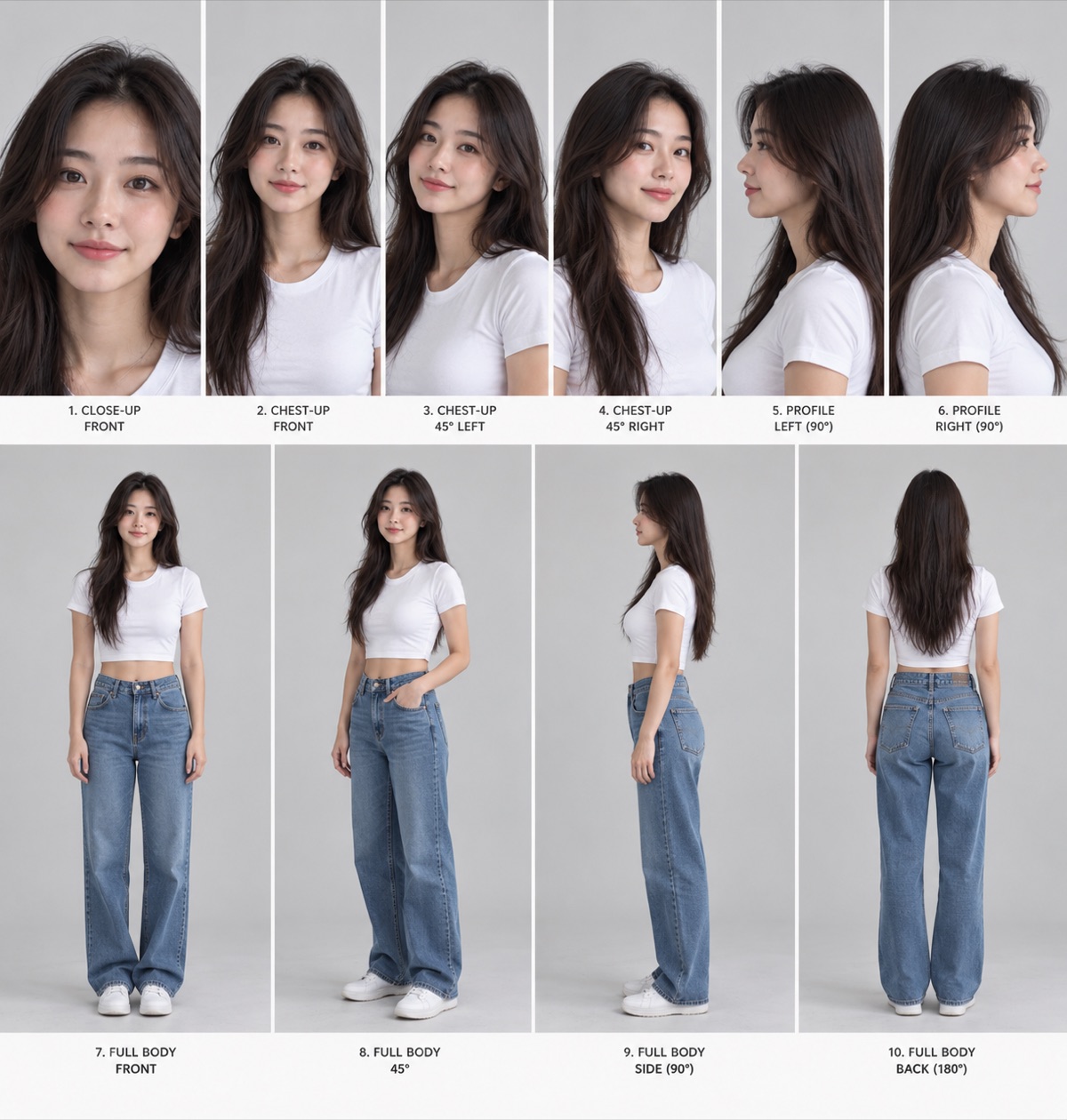
Example of a completed master sheet: 10 labeled angles, one neutral outfit, one expression, neutral backdrop. Note the full 180-degree coverage — the rear view matters when a video model needs to turn the character.
Prompt: create the master character reference sheet
Create a professional multi-angle CHARACTER CONSISTENCY REFERENCE SHEET using the uploaded image as the identity reference.

The person in the uploaded image is the ONLY source of truth for the character's identity.

Do not redesign, beautify, or reinterpret the person. Reconstruct the same person as one consistent three-dimensional identity and show them from standardized camera angles.

IDENTITY CONSISTENCY IS THE HIGHEST PRIORITY.

Generate ONE cohesive reference sheet with:

TOP ROW — IDENTITY / FACE
1. close-up — straight-on face
2. chest-up — straight-on
3. chest-up — approximately 45° left
4. chest-up — approximately 45° right
5. chest-up — exact 90° left profile
6. chest-up — exact 90° right profile

BOTTOM ROW — BODY
7. full body — straight-on front
8. full body — approximately 45° three-quarter
9. full body — exact 90° side
10. full body — exact 180° rear view

Use a seamless neutral light-gray studio background, consistent soft frontal lighting, minimal lens distortion, and the exact same wardrobe in every panel.

Do NOT independently regenerate the person for each panel. Conceptually reconstruct ONE three-dimensional person and rotate that same person.

Preserve the same facial geometry, nose projection, jaw structure, eye placement, hairline, skin tone, body proportions, apparent age, and wardrobe across every view.

The output must look like one real person photographed from ten angles during the same studio session.
Why this is better than saving one generated photo
One image only tells the model what the character looks like from one angle, one lens, one expression, and one lighting setup.
A reference sheet gives you front, profile, body, and rear information in one reusable identity file.
Use the full sheet as your master identity reference. Then pull the closest angle from the sheet when you need extra control for a specific shot.
2. Use Astra to extract the visual style
Your character sheet should stay neutral.
Do not bake cinematic lighting, heavy color grading, film grain, or a specific location into the character file. That makes the identity less reusable.
Instead, find a photo with the aesthetic you want and give it to Astra.
The style reference answers:
How should this shot look?
Your character sheet answers:
Who is this person?
Prompt: extract a style reference with Astra
Analyze this image as a reusable photographic style reference.

Return one detailed JSON object describing ONLY the visual treatment of the image so I can apply that look to future images with different people and products.

Separate visual style from subject identity.

Break down:
- lighting direction, softness, intensity, contrast ratio, and practical light sources
- exposure and highlight rolloff
- shadow density and black levels
- white balance and color temperature
- exact dominant colors and approximate hex values
- skin rendering characteristics without describing the person's identity
- saturation and contrast
- color grading in highlights, midtones, and shadows
- lens perspective and likely focal-length range
- aperture / depth-of-field characteristics
- camera height and framing
- composition
- film grain / digital noise / texture
- sharpness and micro-contrast
- background treatment
- any bloom, halation, flare, diffusion, motion blur, or optical imperfections

Do not describe or copy the person's facial features, body, clothing, ethnicity, age, or identity.

End with a compact `style_prompt` field that can be pasted into an image-generation prompt.
The important rule
Steal the photography, not the person.
The style image controls lighting, grading, grain, lens feel, and composition.
Your character file controls identity.
3. Generate a new image using both
For a new image, combine:
- character reference — identity
- style reference / Astra JSON — photographic treatment
- scene instruction — what happens
- product reference — if needed
Prompt: combine identity + style
Use the attached character reference as the canonical identity source.

Preserve the exact same person: facial geometry, eye shape and spacing, nose structure and projection, lip proportions, jaw and chin, skin tone and texture, hairline, hair texture, body proportions, and apparent age.

Use the attached style reference / style JSON ONLY for photographic treatment: lighting, color grading, contrast, grain, lens rendering, depth of field, composition, and overall aesthetic.

Do not transfer the person, facial features, body features, wardrobe, or identity from the style reference.

Create this scene:
[DESCRIBE THE SCENE]

If a product reference is attached, preserve the exact product shape, proportions, packaging, logo placement, and colors.

Priority:
1. character identity
2. product accuracy
3. scene instructions
4. photographic style

The result should look like a real photograph of the exact same person in a new situation, not a similar person.
4. Turn the reference file into video
This is where the character sheet becomes more useful than a single portrait.
For video, the sheet acts as your master identity library.
You do not always need to upload every panel individually. Use the full sheet for global identity, then add the closest angle when the shot is difficult.
Seedance test workflow
Use:
- full character sheet
- closest matching angle from the sheet when needed
- location plate if the composition matters
- product reference if needed
Seedance prompt: profile → three-quarter identity test
Use the attached character reference as the exact identity source.

Begin with the same woman in a clean left profile beside a large window. She looks outside for a moment, then naturally turns her head and upper body toward camera until she reaches a three-quarter view.

Slow subtle camera push-in. Soft realistic window light. Natural blinking, subtle breathing, realistic skin texture, and gentle hair movement.

Her nose shape, jawline, eyes, cheek structure, hairline, skin tone, and facial proportions must remain consistent as her head rotates.

Do not morph, beautify, or redesign her face during the turn.
Seedance prompt: full-body walking test
Use the attached character reference as the exact identity source.

Full-body shot of the same woman walking slowly toward camera through a bright minimalist apartment. Preserve the same facial identity, hairstyle, body proportions, and wardrobe from the reference.

She walks naturally, briefly looks away, then looks back toward camera with a subtle smile.

Camera slowly tracks backward at eye level. Natural daylight, realistic body mechanics, subtle hair movement, no exaggerated gestures.

Keep her identity consistent throughout the entire shot.
5. Save winners back into your reference library
Your master character sheet stays the source of truth.
But every time you generate an especially strong shot, save it.
Examples:
- strong selfie
- seated talking-head
- side profile
- full-body walking
- product UGC
- outdoor daylight
- studio setup
Those become shot-specific secondary references.
Over time you are building a reusable character library instead of starting from zero every generation.
The complete reference stack
Identity reference → who the person is
Style reference / Astra JSON → how the shot should look
Location plate → where they are / composition
Product reference → what must stay exact
Source video → motion + camera + timing
Once you understand those roles, prompting becomes much simpler.
Why this matters for founder content
The avatar itself is not the system.
A reference file solves one important problem: consistent identity.
The bigger production problem is still:
- what to say every week
- turning ideas into scripts
- generating usable footage
- editing the footage
- adding hooks, captions, B-roll, and motion graphics
- publishing consistently
That is the layer we build and operate for founders with our Video Engine.
You record once. We ship every week.
Quick checklist
- Create one neutral master character sheet
- Keep identity and style as separate references
- Use Astra to extract lighting + color direction
- Use the closest character angle for difficult shots
- Tell video models what changes and what stays
- Save your best generations as secondary references
- Build a reusable library instead of prompting from zero
The goal is not one perfect AI image.
The goal is a repeatable visual identity system you can keep using across images and video.
Related knowledge
- AI avatars overview
- Your First AI Avatar in HeyGen for the first avatar, voice, and render workflow.
- Two identity prompts for the simpler portrait identity workflow.
- How We Built It: 22M Views in 6 Months for the broader founder content system.
Want this set up for your business?
We turn these workflows into working marketing and sales systems.