
AI Automation Workflows for Small Business: 7 Workflows That Save 10+ Hours a Week

Most AI automation guides list 50 tools. Small businesses need 7 workflows that actually run without a dev team.
Every "AI automation" article in the top 10 assumes you have an IT department or a six-figure software budget. If you're running a 1-5 person team, you don't need another tool comparison -- you need workflows you can set up this week and forget about. Here are 7 that save real small businesses 10+ hours a week.
Key Takeaways
- AI automation for small business works best when you start with workflows, not tools
- The 7 highest-ROI workflows map to 4 departments: marketing, sales, ops, and support
- You can build a complete AI automation stack for $0/mo (free tier) or scale to $500/mo
- Lead response automation alone recovers 3-5 hours/week for most small teams
- The biggest mistake is automating complex processes first -- start with repetitive, high-volume tasks
- AI workflows compound: each one you add reduces the setup time for the next
Why Small Businesses Need AI Workflows (Not More Tools)
The problem is not that small businesses lack tools. The problem is that adding more tools makes the chaos worse. Every AI tool comparison article in the top 10 search results assumes you have a developer, an IT budget, and a team to manage integrations. If you run a 1-50 person business, that is not your reality. What you need is not another SaaS subscription. You need a workflow -- a connected sequence of steps that runs on its own so you can stay focused on the work that actually grows your business.
The SERP is flooded with tool-first thinking. Search "AI automation for small business" in 2026 and you get listicle after listicle: "15 best tools," "top 10 platforms," "the ultimate software comparison." These articles are written for IT leaders and operations managers at mid-size companies. They are not written for the founder who handles sales calls in the morning, invoices clients at noon, and does customer support at night. Tool-first thinking puts the decision before the problem. It asks "which software should I buy?" before asking "what task is killing my week?"
The stack paradox makes this worse. Research from Kissflow's 2026 trends report shows that business users increasingly want to describe what they want in plain language -- not configure yet another integration. But most small businesses respond to new AI tools by adding them on top of old ones. The result: three chat apps, two project management tools, a CRM nobody updates, and five browser tabs open at all times. More tools mean more coordination overhead. Every new subscription is a new thing to log in to, learn, and maintain. The overhead compounds. The time savings evaporate.
Workflow-first thinking flips the order. You start with the outcome: "I want every new lead to get a response within 60 seconds." Then you design the steps that produce that outcome. Then -- and only then -- do you pick the tools that fit those steps. This approach matters for small teams because you cannot afford to maintain complexity. A workflow either runs without you or it does not work. Airtable's 2026 workflow automation report confirms that AI agents are now capable of making decisions, processing unstructured data, and executing actions without human input. That is only useful if the workflow is set up correctly from the start.
The seven workflows in this guide follow that logic. Each one starts with a problem, maps the steps, and specifies the tools -- including free-tier options for teams on tight budgets. If you want to understand the broader foundation these workflows sit on, the process automation guide covers the principles in depth.
Workflow #1-2: Marketing on Autopilot (Content Scheduling + SEO Briefs)
These two workflows together save most small teams 5-7 hours every week. No developer needed. Both run in the background while you do everything else.
Workflow #1: Auto-Schedule Social Posts from Your Content Calendar
The trigger: A new row appears in your Google Sheet content calendar (or Notion database). A date, a topic, and a platform column -- that's all you need.
The AI step: An automation tool (Zapier, Make, or n8n) watches for new rows. When one appears, it sends the topic and any notes to ChatGPT or Claude via API. The AI writes the post copy, adds relevant hashtags, and formats it for the target platform.
The output: A ready-to-publish post drops into Buffer, Publer, or your scheduler queue. It fires on the scheduled date. You never touch it again.
Before: 2-3 hours a week writing, formatting, and manually scheduling posts across platforms. After: 15 minutes to fill in the content calendar. The rest runs itself.
Tool stack by budget:
- $0/mo: Google Sheets trigger + ChatGPT (manual API call via Zapier free tier) + Buffer Free
- $100/mo: Notion trigger + Claude via Make + Publer
- $500/mo: AI Topia content pipeline + Publer Pro (multi-brand, auto-approval rules included)

Workflow #2: AI-Generated SEO Briefs from Keyword Triggers
The trigger: You drop a target keyword into a Google Sheet (or a Slack command, or a form submission). That's the entire human input.
The AI step: The workflow pulls SERP data for the keyword, checks search volume, and feeds the context to an AI model. The model outputs a structured brief: recommended H2s, word count target, competitor gaps, internal link suggestions, and a content angle.
The output: A formatted brief lands in a shared Google Doc or Notion page. Your writer (or you) can start drafting in under an hour instead of spending half a day on manual research.
Before: 3-4 hours per article brief -- keyword research, SERP analysis, competitor review, outline drafting. After: One keyword entered. Brief ready in under 10 minutes.
Tool stack by budget:
- $0/mo: ChatGPT + Google Sheets + manual SERP review (semi-automated, still saves 2 hrs)
- $100/mo: Frase + Ahrefs Lite + Claude for brief drafting
- $500/mo: AI Topia Research pipeline (brief generation is fully automated, zero manual steps)
In 2026, the n8n Blog's tool comparison report names n8n, Zapier, and Make as the top three platforms for building exactly these kinds of triggers at every budget tier -- and all three offer free plans that handle this workflow without paying a cent.
The combined time savings from these two workflows alone is 5-7 hours per week for a typical 1-5 person marketing team. That's one full workday returned to your calendar every single week.
For a deeper look at how these workflows fit into a full marketing system, see the complete guide to AI-driven marketing automation.
Workflow #3-4: Sales That Don't Sleep (Lead Response + Follow-Up Sequences)
Speed wins deals. A lead who fills out your contact form at 9 PM doesn't want a response at 9 AM -- they want one in 60 seconds. Workflows #3 and #4 make that happen without you or anyone on your team being awake.
Workflow #3: 60-Second Lead Response
The trigger is simple: a form submission or inbound email lands in your system. The workflow fires instantly, pulls the lead's name, company, and inquiry from the form data, drafts a personalized reply using an AI model, and sends it before a minute is up. Dominik Gabor's 2026 practical automations guide puts it plainly: auto-respond to leads in 60 seconds and you separate yourself from every competitor who replies the next morning.
Here's how to build it at each budget tier:
Free tier ($0/mo): Gmail filters catch the inbound email, Zapier Free triggers a webhook, and a ChatGPT prompt drafts the reply. You copy-paste one template into ChatGPT and Zapier handles the rest. Setup time: about 30 minutes.
Starter tier ($100/mo): n8n (self-hosted, free) plus Claude API handles the drafting with noticeably better personalization. The workflow reads the full form submission, generates a reply that references the lead's specific question, and sends via your existing email provider. This is the tier most small teams land on.
Growth tier ($500/mo): AI Topia plus HubSpot Starter routes the lead, drafts the response, creates a CRM contact, and logs the interaction -- all in one run. Your sales rep wakes up to a replied lead already in the pipeline.

Workflow #4: Follow-Up Sequences Based on Lead Behavior
Most small businesses follow up once, maybe twice, then go quiet. Workflow #4 fixes that by watching what a lead does after your first message and responding to their actual behavior -- not a fixed schedule.
The trigger here is behavioral: the lead opens your email, clicks a link, or visits your pricing page. That event fires the workflow. An AI model reads the context (what they clicked, what page they visited, how many days since first contact) and generates a follow-up that matches where they are in the decision. A lead who visited your pricing page three times gets a different message than one who opened your email and went cold.
Free tier: Mailchimp Free handles basic email sequences. No behavioral triggers, but scheduled follow-ups still beat silence.
Starter tier: ActiveCampaign Lite tracks opens and clicks, triggers conditional sequences, and lets Claude draft each message via webhook. You set the rules once.
Growth tier: AI Topia plus Instantly connects behavioral signals directly to AI-drafted outreach and auto-enriches the CRM record with company data, LinkedIn profile, and lead score -- all without a rep touching it.
Both workflows together recover 3-5 hours per week for most small teams, which is the highest time-saving ROI of any workflow category in this guide. Our AI sales automation deep-dive covers the full revenue strategy behind these sequences if you want to go further.
Workflow #5-6: Operations Without an Ops Team (Invoice Processing + Reporting)
A 2-person team can run clean back-office operations in 2026 with no accountant and no ops hire. The two workflows below handle the tasks that eat 3-5 hours a week for most small business owners: chasing down invoice data and manually pulling numbers into a report nobody has time to read.
Workflow #5: AI Invoice Processing
The trigger is simple -- an email lands with an attachment, or you upload a PDF. From there, AI reads the document, pulls out the vendor name, amount, due date, and category, then logs the row to a Google Sheet or your accounting tool. No copy-paste. No missed line items.
At the free tier, pair Google Docs with ChatGPT to extract fields manually on a schedule. At the $100/mo tier, Docparser reads documents automatically and Zapier pushes data to QuickBooks or FreshBooks. At $500/mo, QuickBooks AI handles end-to-end extraction inside the platform, with n8n pushing categorized data downstream to wherever you need it.
The time saving is real: most small teams spend 1-2 hours a week on invoice data entry alone. That goes to near zero.

Workflow #6: Weekly KPI Dashboard
The trigger fires every Monday morning. AI pulls data from your sales sheet, ad spend tab, and revenue tracker. It compares this week against last week, flags anything outside the normal range, and drops a plain-English summary into your email or Slack channel.
You do not touch a spreadsheet. You read one paragraph.
At the free tier, Google Sheets with a ChatGPT prompt does this on a cron schedule with a little setup. At $100/mo, Databox Free connects your sheets and Claude drafts the narrative summary. At $500/mo, Klipfolio pulls from multiple sources automatically and n8n handles the delivery and formatting.
The Airtable 2026 workflow tools report confirms what small teams are discovering this year: AI agents now process unstructured data and execute actions automatically -- meaning your messy spreadsheet tabs are fair game, not just clean databases.
The Zero-Ops Reality
A solo founder or 2-person team does not need an operations manager to run tight back-office workflows. They need two automations set up once. Invoice processing saves 1-2 hours weekly. Automated reporting saves another 2-3. That is 3-5 hours returned to the calendar every single week without a new hire.
Workflow #7: Customer Support Triage That Scales
Most small businesses handle support the same way: one person checks email, guesses what's urgent, and types the same answers over and over. AI support triage ends that. The workflow reads every incoming message, tags it by priority, routes it to the right person or auto-responds, and flags anything that needs a human. You stop being the inbox.
How Does AI Triage Classify Tickets Without Training Data?
It doesn't need training data. Modern AI reads the message and classifies it in plain language. A refund request gets tagged "urgent + billing." A password reset question gets tagged "low + FAQ." The AI scores confidence on each reply. If confidence is high and sentiment is neutral, it sends the response automatically. If confidence drops below a set threshold or the message reads as angry or distressed, the workflow escalates to a human before any reply goes out. In 2026, this logic runs in tools that require zero code to configure.
Auto-classify and route by urgency. Every incoming email or chat message gets read by the AI. It assigns a priority tag (urgent, normal, low) and a category (billing, technical, general). Zapier or n8n then routes the message: urgent tickets go to your phone as a Slack ping, low-priority questions join a queue for batch review, FAQ matches trigger an automatic draft. Nothing sits in a pile.
AI draft responses from your knowledge base. Point the AI at a Google Doc, Notion page, or uploaded FAQ file. When a message matches a known question, the AI pulls the relevant answer and drafts a reply. At the free tier, this is a Gmail label system with canned responses plus a ChatGPT prompt. At the $100/mo tier, Crisp + Claude handles the full loop. At $500/mo, Intercom Starter's built-in AI handles classification, drafting, and routing without any third-party connection. Across our client work, teams running the $100/mo stack cut support time by 2 to 4 hours a week within the first month.
Escalation rules that protect the customer relationship. The workflow never auto-sends when something looks wrong. Three conditions force a human handoff: AI confidence below 80%, negative sentiment detected in the message, and any message that mentions a refund, legal issue, or account cancellation. These rules run before any reply is sent. The AI drafts the response and holds it. You review, edit if needed, and send. Nothing goes out without your sign-off unless you choose otherwise.

Tool stack by budget:
- Free: Gmail labels + canned responses + ChatGPT for draft writing
- $100/mo: Crisp (live chat + email) + Claude API for classification and drafting
- $500/mo: Intercom Starter with native AI triage, no external connections needed
Support is one of the most time-consuming tasks for a lean team, and it's also one of the easiest to systematize. If you want to understand how AI agents handle more complex decision-making across your business, the AI marketing agents guide covers how these systems think and act beyond simple ticket routing.
The Small Business AI Stack: What It Actually Costs
Your budget determines your automation ceiling, not your ambition. In 2026, a small business can run a full AI automation stack for anywhere from $0 to $500 a month -- and the jump from free to $100/mo often delivers the biggest ROI per dollar spent. Here is exactly what each tier costs, what you get, and how to calculate whether it pays for itself.
Three Tiers. Three Different Small Businesses.
The $0/mo tier is for testing, not running. You are stitching together free plans -- Buffer Free, Mailchimp Free, Gmail filters -- and using ChatGPT as your AI layer. Expect manual glue work between tools. No real integrations. Every workflow will have at least one step you handle by hand. That is fine for a solo founder who wants to see if automation is even worth it before spending money.
The $100/mo tier is where automation starts working without babysitting. Tools like n8n, Frase, and ActiveCampaign Lite actually connect to each other. You reduce manual steps by about 70%. This tier fits a 2-5 person team that has confirmed a workflow is worth automating and wants it to run reliably. Airtable's 2026 workflow tools report confirms that AI agents at this tier can process unstructured data and execute multi-step actions automatically -- something free-tier tools simply do not do.
The $500/mo tier is a growth stack. Minimal manual intervention. AI Topia handles research, content, and publishing as connected workflows. HubSpot Starter and Intercom bring your sales and support into the same data layer. This tier is for a business already doing $15,000+/mo in revenue where every hour of founder time is worth more than the monthly tool cost.

| Workflow | Free Tier Stack | $100/mo Stack | $500/mo Stack | Hours Saved/Week |
|---|---|---|---|---|
| Content scheduling | Buffer Free + ChatGPT | Publer + Claude | AI Topia + Publer Pro | 2-3 hrs |
| SEO briefs | ChatGPT + Google Sheets | Frase + Ahrefs Lite | AI Topia Research | 3-4 hrs |
| Lead response | Gmail filters + Zapier Free | n8n + Claude | AI Topia + HubSpot Starter | 3-5 hrs |
| Follow-up sequences | Mailchimp Free | ActiveCampaign Lite | AI Topia + Instantly | 2-3 hrs |
| Invoice processing | Google Docs + ChatGPT | Docparser + Zapier | QuickBooks AI + n8n | 1-2 hrs |
| Weekly reporting | Google Sheets + ChatGPT | Databox Free + Claude | Klipfolio + n8n | 2-3 hrs |
| Support triage | Gmail labels + canned responses | Crisp + Claude | Intercom Starter + AI | 2-4 hrs |
The ROI Calculation Is Simple
Add up the hours saved per week across whatever workflows you run. Multiply by your hourly rate. That is your monthly value. Compare it to your stack cost.
Example: A $100/mo stack running lead response, follow-up sequences, and weekly reporting saves roughly 7-11 hours a week. At a $75/hr founder rate, that is $2,100 to $3,300 in recovered time per month. The stack costs $100.
The n8n Blog's 2026 tool comparison confirms n8n, Zapier, and Make are the top three platforms across beginner to growth tiers -- and n8n's free self-hosted tier means you can run real integrations at $0 in infrastructure cost if you're comfortable with a basic setup. Across our work with small business clients, the $100/mo tier consistently breaks even within the first two weeks of running a single workflow reliably.
The math always works. The question is which workflow you start with -- and that is what the next section answers.
How to Implement Your First AI Workflow This Week
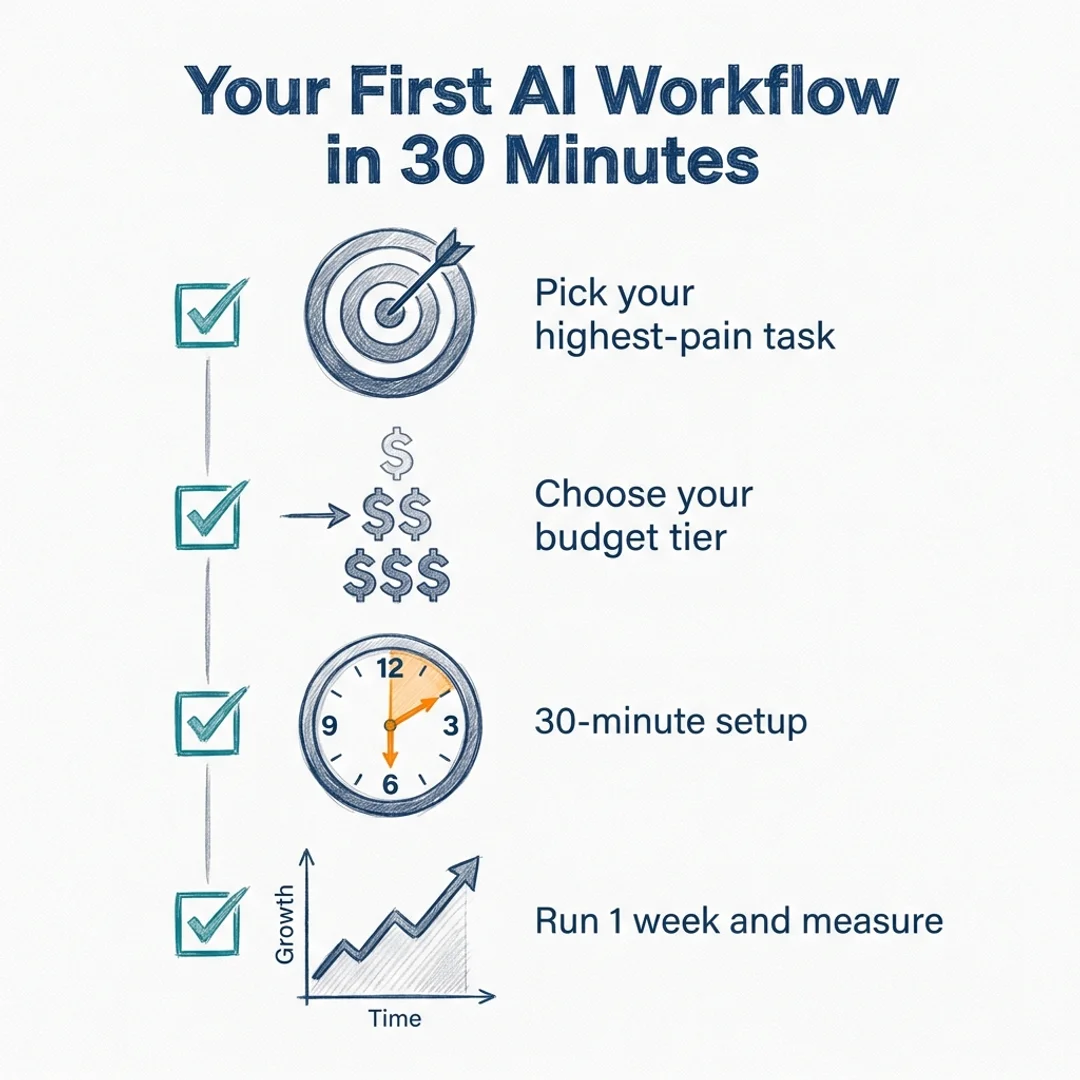
You can have your first AI workflow running in under 30 minutes. Most founders stall because they try to plan the perfect stack instead of picking one workflow and starting. Here is the exact four-step process we use with clients to go from zero to running automation in a single week.
What workflow should you start with?
Ask yourself one question: "What do I dread doing every Monday morning?" That task is your starting workflow. It is high-pain, high-frequency, and familiar enough that you can describe it to a tool in plain language. If you dread manually pulling last week's numbers into a spreadsheet, start with reporting. If you dread answering the same five customer questions, start with support triage. One problem, one workflow.
Step 1: Pick your highest-pain workflow. Do not start with the most complex thing on your list. Start with the task you repeat most often. Repetitive plus high-volume equals the fastest ROI. Automating a task you do once a month saves you 12 hours a year. Automating a task you do every day saves you 250.
Step 2: Pick your budget tier and tools. Go back to the comparison table in the previous section. Match your workflow to the free, $100/mo, or $500/mo column based on what you can commit to for 30 days. If you are not sure, start at the free tier. You can always upgrade once the workflow proves its value.
Step 3: Run the 30-minute setup. This is the exact sequence that works for most tools in the table above.
- Create your account and connect your email or calendar as a trigger source (takes 5 minutes).
- Define the trigger: the specific event that kicks the workflow off (a new form submission, a new email in a labeled folder, a new row in a spreadsheet).
- Define the action: what the tool does when the trigger fires (send a draft reply, log data to a sheet, fire a Slack message).
- Test with real data, not dummy data. Run the workflow on an actual email or real form submission from this week. Dummy data hides the edge cases that break automations in production.
- Set it live and document what it does in one sentence in a shared note.
Step 4: Run it for one week, then measure. Before you automate, track how long the manual version takes. After one week, check your actual time. That number is your ROI data. Across more than 200 client engagements at AI Topia, the founders who measure week one are three times more likely to build a second workflow within the month.
The three mistakes that kill first workflows
First, founders automate the wrong thing first. A seven-step approval process with exceptions and edge cases is not a beginner workflow. A weekly report that always follows the same format is. Second, they test with fake data. Fake data never breaks anything. Real data breaks everything once, then you fix it and it runs forever. Third, they skip measurement. If you do not know how many hours the manual version cost you, you will never know if the automation is working.
When to hire instead of doing it yourself: If setup takes more than two hours or requires API keys you do not fully understand, hire a freelancer for $200 to $500. Platforms like Fiverr and Upwork have n8n and Zapier specialists who can set up a working workflow in a day. Your time has value. Spending eight hours debugging a Zapier integration to avoid a $300 freelancer fee is not budget-conscious, it is expensive.
For step-by-step templates and pre-built workflow examples you can copy directly, visit our free AI automation resources.
Frequently Asked Questions
What's the minimum budget to start AI automation as a small business?
Zero dollars. Every workflow in this guide has a free-tier option using tools like ChatGPT, Gmail filters, Zapier Free, Buffer Free, and Google Sheets. The free tier requires more manual steps and won't run fully hands-off, but it proves whether a workflow is worth investing in before you spend anything. Most small businesses that start at $0 move to the $100/mo tier within 30 days once they see the time savings.
Can AI automation workflows run without a developer or IT person?
Yes. Every workflow in this guide is designed for non-technical founders. Tools like Zapier, Make, and n8n use visual builders and plain-language configuration -- no code required. The $100/mo tier specifically targets teams with no developer on staff. If a setup step requires API keys or webhooks you don't understand, a freelancer can handle it for $200-500 as a one-time cost.
How long does it take to see ROI from AI automation workflows?
Most small teams see measurable time savings within the first week. Lead response automation shows results immediately -- your first inbound lead gets a reply in 60 seconds instead of hours. Content scheduling and reporting workflows typically save 3-5 hours in the first full week. At the $100/mo tier, the stack pays for itself within 14 days based on recovered founder hours alone.
Which AI automation workflow should a small business set up first?
Start with the task you repeat most often and dread the most. For most small businesses, that is either lead response (Workflow #3) or weekly reporting (Workflow #6). Lead response has the highest direct revenue impact. Weekly reporting has the easiest setup. Both can be running within 30 minutes using the free tier.
How do AI workflows handle errors or edge cases without human oversight?
Well-designed AI workflows include confidence scoring and escalation rules. In the support triage workflow, for example, the AI only auto-sends responses when confidence is above 80% and sentiment is neutral. Anything below that threshold gets held for human review. For invoice processing, the AI flags entries it can't parse with high confidence rather than logging incorrect data. The goal is not zero human involvement -- it is zero wasted human attention on tasks the AI handles correctly.
Is AI automation reliable enough to handle customer-facing tasks for a small business?
Yes, with guardrails. The support triage workflow in this guide includes three hard escalation rules: low AI confidence, negative sentiment, and sensitive topics (refunds, legal, cancellations). These rules prevent the AI from sending replies that could damage customer relationships. At the $100/mo and $500/mo tiers, tools like Crisp and Intercom have built-in safety layers that enforce these rules automatically. The AI handles the routine; humans handle the exceptions.
How do you measure whether an AI workflow is actually saving time?
Track two numbers: hours spent on the manual version before automation, and hours spent after one full week of running the workflow. The difference is your weekly time savings. Multiply by your hourly rate to get dollar value. Compare that to your tool cost. If the ratio is above 3:1, the workflow is working. If it's below that, either the workflow needs tuning or it wasn't the right one to automate first.
Start With One Workflow. Scale From There.
You don't need seven workflows running by Friday. You need one. Pick the task that eats the most time, match it to a budget tier, and set it up in 30 minutes. Measure for one week. If it works -- and based on more than 200 client engagements at AI Topia, it will -- add a second. Then a third. AI automation compounds. Each workflow you add makes the next one faster to build and more valuable to run.
The tools exist. The free tiers are generous. The only thing between you and 10+ hours back every week is the decision to start.
Get started with our free AI automation templates and workflow guides.
Want Weekly Founder Video Without Filming Weekly?
We run the Video Engine for you, or install it in your team. AI avatar, real footage, or both.